What Viktor cleans (and why it's safe)
Viktor only cleans categories that either regenerate themselves or have lost their meaning. For each one it shows you the size and a short why it's safe. You pick with checkboxes — nothing is mandatory.
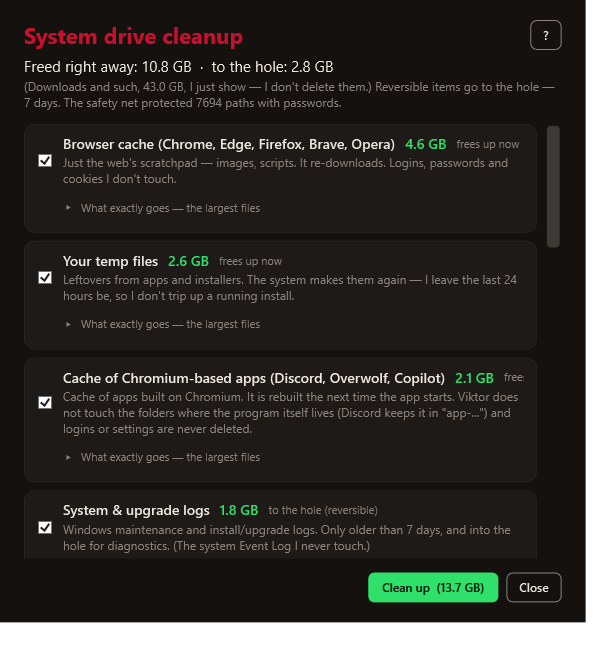
Freed instantly vs. into the hole
So you get your space right away, Viktor cleans on two levels:
- Freed instantly — purely regenerable junk (temp, cache, thumbnails, shaders, update leftovers) is deleted directly, so you have the space immediately. These things recreate themselves anyway, undo makes no sense for them.
- Into the hole (reversible, 7 days) — only things you might want back: logs, crash dumps, error reports. Those go into the hole; the space is freed once you empty it or after it expires in 7 days.
In the cleanup preview you see both numbers separately: "Free instantly: X · into the hole: Y".
What's pre-checked (and what isn't)
Viktor pre-selects only what is worth it and costs you nothing:
- Small items under 50 MB are left unchecked — cleanup focuses on what actually shows.
- Shader cache is always left unchecked: deleting it breaks nothing, but the graphics driver then compiles the shaders again and the first launch of your games stutters. If you want to clear it, check it yourself.
It's just the default checkbox state — you can check anything extra.
Cleanup categories
| Category | What it is | Why it's safe to delete |
|---|---|---|
| Temporary files | user and Windows Temp | Leftovers from apps and installers; the system recreates them. I keep files from the last 24 h. |
| Browser caches | Chrome / Edge / Firefox / Brave / Opera cache | Just a scratch cache of websites (images, scripts). Downloads again. I never delete passwords, cookies or logins. |
| Caches of Chromium-based apps | Discord, Overwolf, Copilot and friends | These programs have a browser window inside and the same scratch cache. It is rebuilt on the next start. I never touch the folders where the program itself lives. |
| WebView2 cache | the browser window embedded in other programs | A shared Windows component; this is only its cache. Your logins in those programs stay. |
| Leftovers from app installers | unpacking folders and already installed updates | Packages that have done their job. The program downloads them again if needed. |
| Thumbnails | file and icon previews | Windows renders them again the first time you open a folder. |
| Shader cache (GPU) | precompiled shaders | The driver generates them again; the first game launch may be a bit slower. |
| Logs and dumps | app crashes, setup/maintenance, WER | See retention below. |
| Update leftovers | downloaded packages of already-installed updates | Windows downloads them again if needed. |
Want to see exactly what disappears?
Every category in the Cleanup window has an expandable row "What exactly disappears — the biggest files": the ten largest files in the category with full path and size, plus a "… and N more files" summary. No blind cleanup — before you check anything, you can look at what that number actually contains.
Log retention — I keep a fresh trail
Logs and dumps can be useful when you're solving a fresh problem. So Viktor deletes only those older than 7 days and keeps the last 7 days:
- App crash dumps — old failures gone, the newest one stays.
- System/install logs (
Windows\Logs,Panther) — older gone. - Error reports (WER) — older gone.
Important: the Windows Event Log is never deleted by Viktor — the health check reads from it. Its history is managed by Windows itself.
What Viktor only shows, but doesn't delete
Viktor never deletes the Downloads folder by itself — that's your data. It only shows the size and suggests you take a look.
See also: The Hole and undo · Safety